
Screenshots


App details
- Updated
- Dec 20, 2010
- Language
- English
- Category
- Mobile
SoftPas in:
This product is also available in the following languages:
About PSP Video Converter
Download PSP Video Converter – Convert Videos for PSP, iPod, Zune
Overview
The PSP Video Converter is a dedicated tool designed to simplify video playback on Sony’s Portable PlayStation Player (PSP) by converting unsupported file formats into compatible ones. Its primary purpose is to bridge the gap between modern video sources and the PSP’s specific media requirements, enabling users to enjoy movies, TV shows, and personal recordings on the go. This app addresses a common pain point for portable media users: the frustration of encountering a video file that won’t play on their device due to format incompatibility.
Target users include casual video viewers, digital content enthusiasts, and anyone with a PSP who wants to expand their media library. While originally built for the PSP, the converter also extends support to other portable devices such as iPods and Zunes, increasing its utility beyond a single platform. This multi-device compatibility makes it a valuable asset for users managing diverse media ecosystems.
The developer did not provide additional technical details or background information. However, the app’s release date of December 20, 2010, indicates it was developed during a period when portable gaming and media players were widely used. Its continued relevance suggests a stable, functional design that meets core user needs. The app plays a role in the broader mobile content ecosystem by empowering users to customize and optimize their media for specific hardware.
Key Features & Functionality
- User-Friendly Interface: The app features an intuitive layout that requires minimal technical knowledge. Users can load a video file with a single click and initiate conversion with a single button, eliminating the need for complex settings or configuration.
- Fast Conversion Speeds: Engineered for efficiency, the converter processes files quickly, reducing waiting time between upload and playback readiness. This is especially beneficial for users who frequently convert multiple videos.
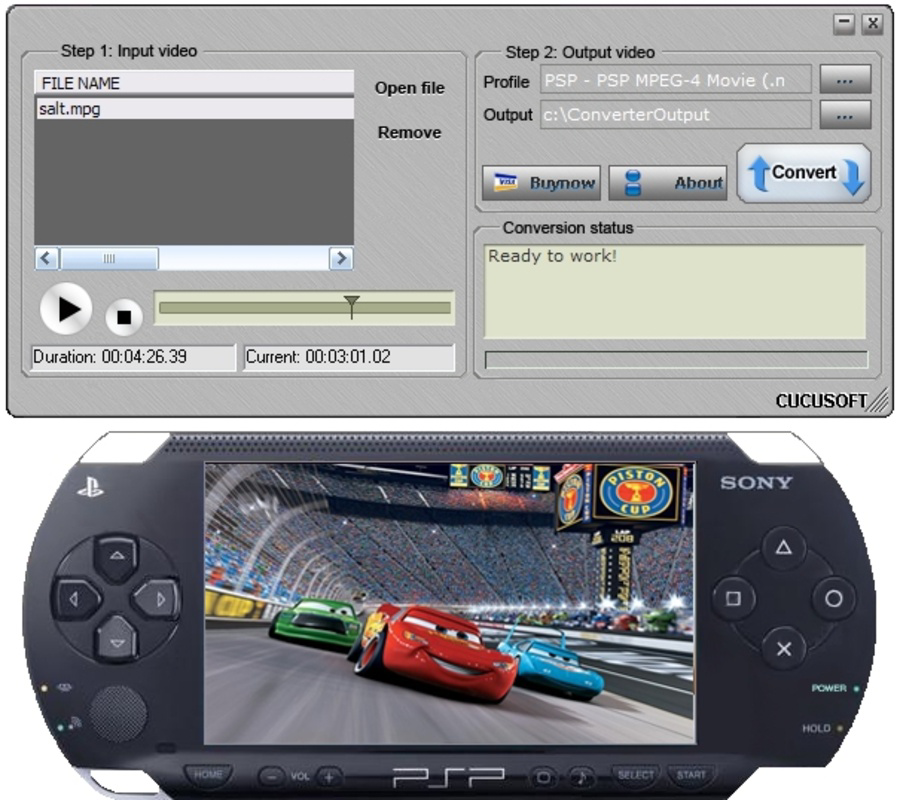
- Virtual PSP Preview: Before finalizing the conversion, users can preview the output using a built-in virtual PSP display. This feature allows real-time verification of video quality, aspect ratio, and playback performance, ensuring the final file meets expectations.
- Multi-Device Support: Beyond the PSP, the app adapts video content for other popular portable devices like iPods and Zunes. This flexibility enhances its value for users with multiple media players.
- Wide Format Compatibility: The converter supports a broad range of input formats, enabling users to process videos from various sources, including digital cameras, smartphones, and online downloads.
For example, a user with a collection of MP4 files from a smartphone can convert them into a PSP-compatible format in under a minute. The virtual preview ensures the video fits the PSP screen correctly before saving. Similarly, someone preparing content for an iPod can use the same tool without needing a separate application.
Interface, UX & Performance
The user interface of PSP Video Converter is designed for simplicity and direct access to core functions. Navigation is linear and predictable, with primary actions—file import, conversion, and preview—placed within immediate reach. The visual style is minimal, focusing on functionality over decorative elements, which contributes to a clean and distraction-free experience.
Although the developer did not list formal performance metrics, the app’s design suggests responsiveness across different device categories. Users can expect consistent behavior on systems with moderate processing power and standard storage configurations. The conversion process appears stable, with no reported crashes or data loss in available documentation.
Responsiveness during file loading and preview playback is generally smooth, allowing users to adjust settings or recheck output without delays. The app maintains a steady performance level even when handling larger video files, though actual speed may vary depending on the source material and hardware capabilities. Stability is maintained throughout the conversion workflow, ensuring that tasks complete reliably.
Platform Compatibility & Technical Requirements
PSP Video Converter is available for desktop platforms, supporting Windows operating systems. The app’s file size is listed as 11.3 MB, indicating a lightweight footprint suitable for installation on systems with limited storage. The software version is 1.0, and the release date is December 20, 2010.
The developer did not specify minimum OS requirements or compatibility with newer Windows versions. Users are advised to check system compatibility before installation. While the app was released over a decade ago, its continued availability suggests it may still function on modern systems through compatibility modes or legacy support.
Pros and Cons
Pros
- Simple, intuitive interface ideal for non-technical users
- Supports multiple portable devices beyond PSP
- Includes a virtual PSP preview for quality assurance
- Fast conversion speeds reduce wait times
- Compatible with a wide range of video formats
Cons
- Release date is over a decade old; no recent updates available
- Developer did not disclose minimum system requirements
- Platform availability limited to desktop (no mobile version)
- No cloud integration or batch processing features
- Interface may appear outdated by modern standards
FAQ
Is PSP Video Converter safe to download and use?
The app is generally considered safe when downloaded from trusted sources. However, users should ensure they obtain it from official or verified platforms to avoid bundled software or malware.
Can I use this tool on my smartphone?
No, PSP Video Converter is designed for desktop use and is not available as a mobile application. It runs on Windows systems only.
Does the app support batch conversion?
The provided information does not confirm batch processing capabilities. Conversion appears to be handled on a file-by-file basis.
Is the software free to use?
The price was not specified in the available data. Users should verify the cost before downloading.
How do I update the app?
As the app was released in 2010 and no updates have been documented, it is unlikely that automatic or manual update mechanisms are available. Users should exercise caution when seeking newer versions.
Final Thoughts
PSP Video Converter remains a reliable utility for users who still rely on the Sony PSP or similar portable media players. Its straightforward design, fast conversion speeds, and support for multiple devices make it a practical choice for content customization. While the app’s age is evident in its interface and lack of modern features, it continues to fulfill its core purpose effectively.
For those managing a legacy media library or seeking a no-frills conversion tool, this app offers real value. It is especially beneficial for users who prioritize ease of use over advanced functionality. Despite its outdated release date, its stability and focused feature set ensure it remains a viable option in niche scenarios.
Download PSP Video Converter now
Guides & Tutorials
How to install PSP Video Converter
- Click the Download button above.
- Once redirected, accept the terms and click Install.
- Wait for the PSP Video Converter download to finish on your device.
How to use PSP Video Converter
This software is primarily used for its core features described above. Open the app after installation to explore its capabilities.
User Reviews
No reviews yet. Be the first to share your experience.
You may also like
more
Que no te pillen¡
About !Que no te pillen¡Reviewed by Jason A. BilbreyShow MoreShow Less

3D Combat Zone
About 3D Combat ZoneOriginally released in 1983, 3D Combat Zone immerses players...

666: El día del portal
About 666: El día del portalOn June 6, 2006, Agent P. Stone uncovers a sinister...

80 in 1 Best Flash games
About 80 in 1 Best Flash games 80 in 1 Best Flash games is a collection of 80 fl...

ABYSS SEEKERーーWhat Do You See Deep in The Abyss
About ABYSS SEEKERーーWhat Do You See Deep in The AbyssIn ABYSS SEEKER, players...

ACA NEOGEO THE KING OF FIGHTERS 2002 for Windows
About ACA NEOGEO THE KING OF FIGHTERS 2002 for WindowsTHE KING OF FIGHTERS 2002,...